Philips Hue vs. Z-WaveThe 16 Best Smart Home Devices Compared (2026 Buyer's Guide)

We believe in recommending tools and materials we’d use ourselves. Our recommendations are based on independent research and real-world testing. While we may receive commissions for purchases made through our links, our opinions remain our own — un-compromised and expert-led.
Author: Brandly Ombonyo is a Project Management Consultant specializing in automation, advanced security, and intelligent systems integration. He delivers expert design, procurement, and deployment of surveillance, access control, and energy management solutions for developers. Ultimately, Brandly engineers secure, future-ready environments that maximize operational excellence and long-term asset value.
Introduction
Smart home shopping usually comes down to one fork in the road: do you build around Philips Hue, the polished lighting-first ecosystem, or Z-Wave, the do-it-all protocol behind locks, sensors, thermostats, and energy monitors? Rather than making you pick blind, we rounded up 16 standout devices — 8 from each ecosystem — and broke down exactly what each one does well, where it falls short, and who it's actually built for.
Below you'll find our editor's picks, a full side-by-side comparison table, in-depth reviews of every product, a buying guide to help you choose the right protocol for your home, and answers to the questions we hear most often. Whether you're chasing ambient lighting scenes or a fully monitored, automated house, there's a clear path forward here.
Editor's Picks
A quick-glance look at the standout products in this roundup before we dive into the full comparison.
Category | Product | Why We Picked It | Price |
Best Overall Hub | Philips Hue Bridge Pro  | Fast processor, huge device capacity, and the foundation of any full Hue setup. | |
Best for Home Security | Yale Security Deadbolt Lock SL with Z-Wave  | Keyless, auto-locking entry with remote control through your smart home hub. | |
Best for Entertainment | Philips Hue Play HDMI Sync Box 8K  | Turns any HDMI setup into an immersive, screen-synced lighting experience. | |
Best for Energy Monitoring | Aeotec Home Energy Meter 8  | Real-time, whole-home energy and solar production tracking in one device. |
Full Comparison Table
All 16 products, side by side. Tap "Check Price" for current pricing and availability on Amazon.
Product | Ecosystem | Best For | Price |
Philips Hue Bridge Pro | Philips Hue | Whole-home Hue setups | |
Philips Hue Smart Plug (2-Pack) 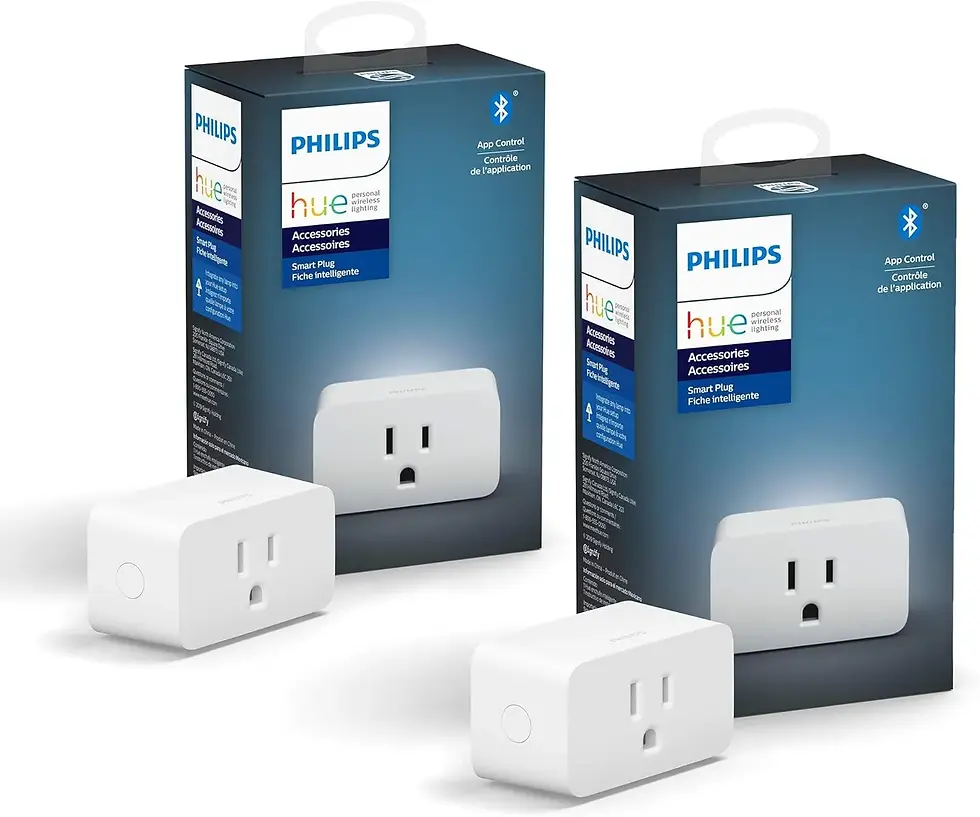 | Philips Hue | Upgrading existing lamps | |
Philips Hue Smart Dimmer Switch Remote 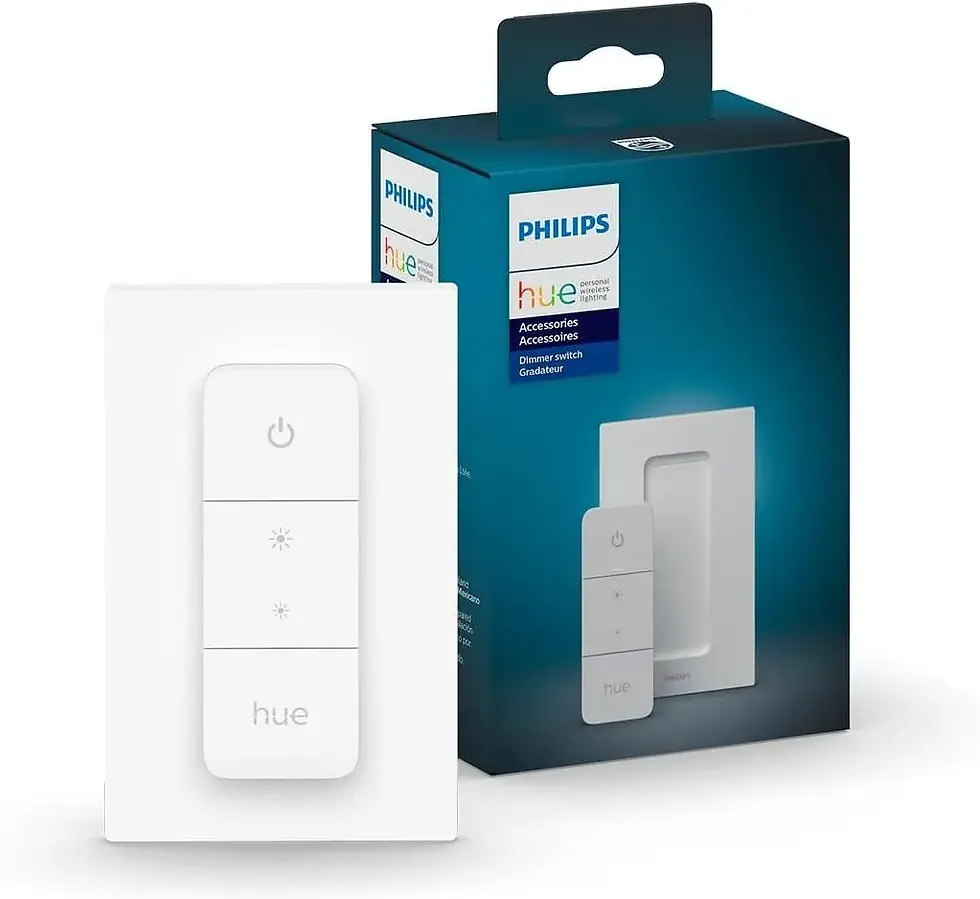 | Philips Hue | Wall-mounted light control | |
Philips Hue Motion Sensor  | Philips Hue | Hands-free indoor lighting | |
Philips Hue Play HDMI Sync Box 8K | Philips Hue | Home theater & gaming | |
Philips Hue Secure Wired Smart Security Camera  | Philips Hue | Indoor/outdoor monitoring | |
Philips Hue Secure Wired Video Doorbell + Chime 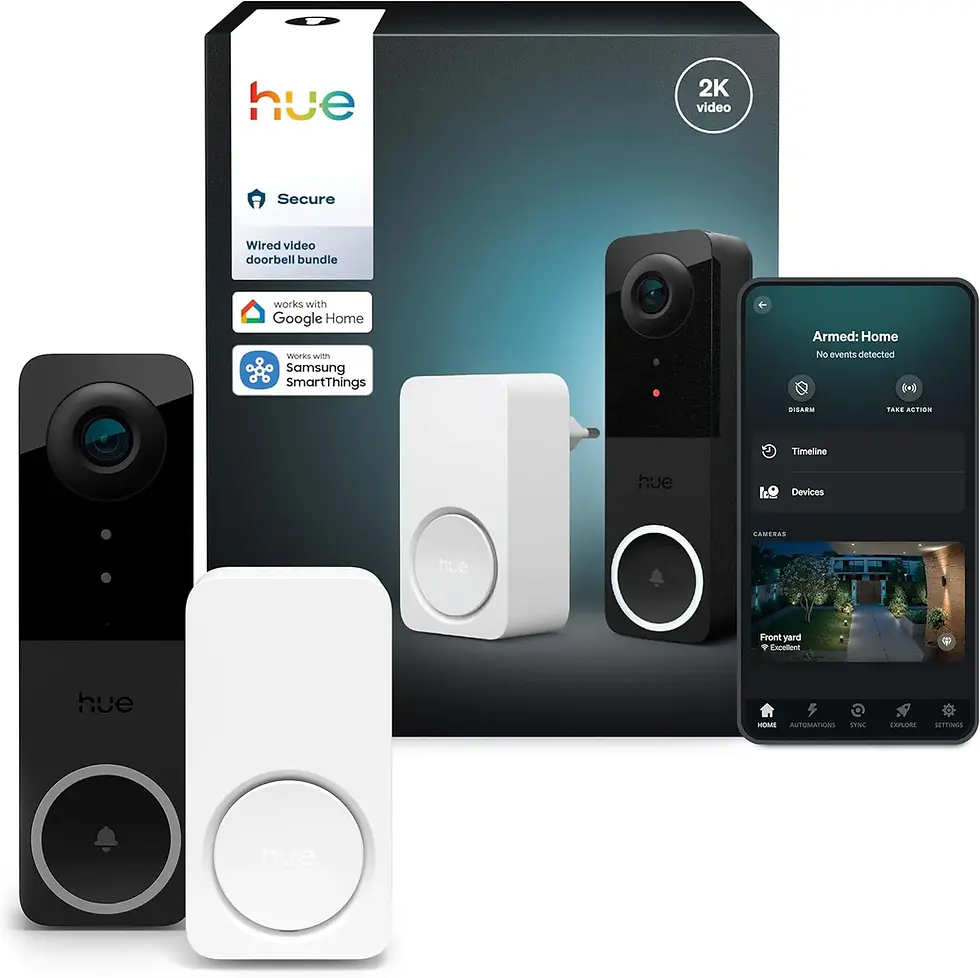 | Philips Hue | Front-door security | |
Philips Hue Outdoor Motion Sensor  | Philips Hue | Driveways, porches & yards | |
Zooz 800 Series Z-Wave Long Range S2 Dimmer Switch ZEN77  | Z-Wave | 3-way / 4-way dimming | |
Zooz 700 Series Z-Wave Plus Outdoor Single Plug ZEN05  | Z-Wave | Outdoor scheduling | |
Yale Security Deadbolt Lock SL with Z-Wave | Z-Wave | Keyless front-door entry | |
Aeotec ZWA012 Z-Wave Plus v2 Door/Window Sensor 7 Pro  | Z-Wave | Discreet entry monitoring | |
2GIG Smart Z-Wave Plus Programmable Thermostat 2GIGSTZ-1  | Z-Wave | Security-panel integration | |
Aeotec Home Energy Meter 8 | Z-Wave | Whole-home energy tracking | |
Govee WiFi Water Leak Detector (3-Pack)  | Z-Wave | Basement & appliance protection | |
First Alert Wireless Smoke & Carbon Monoxide Alarm (Z-Wave & Ring)  | Z-Wave | Life-safety monitoring |
Detailed Product Reviews
Philips Hue Ecosystem
1. Philips Hue Bridge Pro
Why You Should Buy It: The Bridge Pro is the brain of any serious Hue system. Its quad-core Cortex-A35 chip runs at 1.7 GHz — noticeably faster than older bridges — and it ships with 8 GB of storage and DDR4 memory, so it can juggle 150+ lights, 50+ accessories, and up to 500 personalized scenes without lagging. Hue MotionAware also lets you trigger lights automatically based on movement, all from a single compact hub.
Pros: Fast quad-core processor built for advanced automations; supports a huge device count (150+ lights, 50+ accessories); generous onboard storage for hundreds of scenes; built-in motion-aware automation.
Cons: Only worthwhile if you already own, or plan to buy, multiple Hue bulbs and accessories; costs more than a basic hub.
Who It's Best For: Homeowners building out a full-scale Hue lighting system across many rooms who want fast, reliable performance that won't need replacing any time soon.
Price: Check Price on Amazon
2. Philips Hue Smart Plug (2-Pack)
Why You Should Buy It: Rather than buying new smart bulbs, this plug turns any existing lamp into a smart light instantly. It's Matter-compatible, works with voice assistants, and its compact white housing is designed to disappear behind furniture. Pair it with a Hue Bridge and you unlock full scheduling, remote access, and automations.
Pros: Instantly smartens up any lamp you already own; Matter-compatible for broad smart-home support; small, unobtrusive design; works with voice control.
Cons: Full scheduling and remote access require a Hue Bridge; on/off control only, no dimming.
Who It's Best For: Anyone with existing lamps, string lights, or seasonal décor who wants quick smart control without buying new bulbs.
Price: Check Price on Amazon
3. Philips Hue Smart Dimmer Switch Remote
Why You Should Buy It: This battery-powered remote gives everyone in the household — including kids and guests — an easy, no-wire way to turn Hue lights on and off, dim or brighten them, and cycle through preset scenes, without needing to open an app.
Pros: No wiring or electrician needed for installation; simple for non-tech-savvy household members; cycles through favorite preset scenes; rated for a solid 10 A load.
Cons: Needs a Hue Bridge to unlock its full feature set; runs on a battery that will eventually need replacing.
Who It's Best For: Households that want a physical, wall-mounted way to control Hue lighting without always reaching for a phone.
Price: Check Price on Amazon
4. Philips Hue Motion Sensor
Why You Should Buy It: This battery-powered motion sensor automates your Hue lights so they respond the moment you walk into a room. Installation is tool-free, and it's built specifically to integrate with the wider Hue ecosystem for instant, reliable triggers.
Pros: Fully hands-free automatic lighting; simple, no-wire battery installation; integrates directly with existing Hue scenes; compact and easy to place anywhere.
Cons: Requires a Hue Bridge to function; battery life varies with how much foot traffic it detects.
Who It's Best For: Hallways, closets, and entryways where automatic lighting adds everyday convenience and safety.
Price: Check Price on Amazon
5. Philips Hue Play HDMI Sync Box 8K
Why You Should Buy It: The Sync Box turns your Hue lights into an extension of your screen. With an ultra-fast refresh rate, it syncs lighting to on-screen content at up to 8K/60 Hz and 4K/120 Hz, connects up to four HDMI devices, and lets you fine-tune intensity for a fully immersive setup.
Pros: Supports next-gen 8K and 4K/120 sources; connects up to four HDMI devices at once; adjustable lighting intensity via the Hue app; genuinely immersive for movies and gaming.
Cons: The most expensive item on this list; only syncs with HDMI sources, not casted or built-in TV apps.
Who It's Best For: Home theater and gaming enthusiasts who want their room lighting to react in real time to what's on screen.
Price: Check Price on Amazon
6. Philips Hue Secure Wired Smart Security Camera
Why You Should Buy It: This 1080p HD camera delivers crisp live streaming, night vision, and two-way talk, and it ties directly into your Hue lighting — turning lights on or sending an alert the moment motion or sound is detected. Custom activity and package zones cut down on irrelevant notifications.
Pros: Sharp 1080p live video with night vision; two-way talk built in; smart zones distinguish people, animals, and vehicles; automatically triggers your existing Hue lights.
Cons: Requires a wired power connection, limiting placement options; full cloud features benefit from a Hue Secure subscription.
Who It's Best For: Homeowners who want a security camera that actively works with their Hue lights, not just a standalone feed.
Price: Check Price on Amazon
7. Philips Hue Secure Wired Video Doorbell + Chime
Why You Should Buy It: With 2K resolution and a wide-angle view, this doorbell bundle lets you see and talk to visitors from anywhere via two-way audio and real-time notifications. Motion at the door can automatically trigger your Hue lights, and the bundled smart chime keeps you covered indoors too.
Pros: Sharp 2K wide-angle video; real-time push notifications; built-in two-way audio; automatically syncs with Hue lighting on motion.
Cons: The priciest doorbell-plus-chime bundle here; requires wired installation.
Who It's Best For: Homeowners who want complete front-door awareness — sight, sound, and lighting — in one connected package.
Price: Check Price on Amazon
8. Philips Hue Outdoor Motion Sensor
Why You Should Buy It: Built for the elements, this weatherproof sensor offers a wide 160-degree detection area and up to 39 feet of range. Its automatic dusk-to-dawn mode turns lights on the moment someone approaches, and it plays nicely with Alexa, Google Assistant, and Apple HomeKit.
Pros: Wide 160° detection field; fully weatherproof for year-round outdoor use; automatic dusk-to-dawn triggering; broad smart-home compatibility beyond just Hue.
Cons: Requires a Hue Bridge; battery-powered, so it needs periodic replacement.
Who It's Best For: Driveways, porches, and backyards where automatic outdoor lighting boosts both security and everyday convenience.
Price: Check Price on Amazon
Z-Wave Ecosystem
9. Zooz 800 Series Z-Wave Long Range S2 Dimmer Switch ZEN77
Why You Should Buy It: This dimmer directly replaces standard 3-way and 4-way switches without needing an auxiliary switch — a common headache with other smart dimmers. Built on the 800-series Z-Wave radio, it offers long range and smooth dimming that plays well with tricky LED bulbs.
Pros: True 3-way/4-way wiring without extra hardware; smooth, flicker-free dimming for LEDs; long-range 800-series Z-Wave radio; secure screw terminals for a solid install.
Cons: Requires a separate Z-Wave hub; multi-way wiring is easier with some electrical know-how.
Who It's Best For: DIYers replacing existing 3-way or 4-way switches who want dependable, hub-based dimming without buying extra parts.
Price: Check Price on Amazon
10. Zooz 700 Series Z-Wave Plus Outdoor Single Plug ZEN05
Why You Should Buy It: Rated IP65 for weatherproof outdoor use, this plug adds Z-Wave scheduling and smart rules to anything you plug into it — holiday lights, landscape lighting, or small appliances — while handling up to 15 A of resistive load.
Pros: Weatherproof IP65 housing; handles up to 15 A; works with Z-Box, Home Assistant, and Hubitat; great for automating seasonal or landscape lighting.
Cons: No dimming control; requires a Z-Wave hub to operate.
Who It's Best For: Outdoor lighting, holiday displays, or any weatherproof plug-in device you want scheduled and automated.
Price: Check Price on Amazon
11. Yale Security Deadbolt Lock SL with Z-Wave
Why You Should Buy It: This deadbolt swaps your keys for a backlit touchscreen keypad, with auto-lock so you're never left wondering if the door is secure. Add it to a compatible Z-Wave hub or alarm system to lock, unlock, and monitor it from anywhere.
Pros: Keyless code entry with a backlit keypad; auto-lock for extra peace of mind; remote lock/unlock through a compatible hub; durable stainless steel and zinc build.
Cons: Door backset, cross bore, and thickness must be measured carefully before ordering; remote features need a compatible Z-Wave hub.
Who It's Best For: Homeowners who want secure, keyless front-door access with the option to monitor and control it remotely.
Price: Check Price on Amazon
12. Aeotec ZWA012 Z-Wave Plus v2 Door/Window Sensor 7 Pro
Why You Should Buy It: This 3-in-1 sensor packs a magnetic contact, dry contact relay, and tilt sensor into a body that's 40% smaller than the previous generation, all while delivering three-plus years of battery life thanks to a design that uses up to 66% less power.
Pros: Tiny, unobtrusive footprint; 3-in-1 sensing in one device; excellent 3+ year battery life; up to 66% lower battery drain than earlier models.
Cons: Tilt detection only works correctly when aligned with the magnet sensor; requires a Z-Wave hub.
Who It's Best For: Discreetly monitoring doors, windows, or mailboxes as part of a broader home security setup.
Price: Check Price on Amazon
13. 2GIG Smart Z-Wave Plus Programmable Thermostat 2GIGSTZ-1
Why You Should Buy It: Built to pair with 2GIG security panels and Z-Wave hubs, this thermostat adds humidity sensing and control on top of standard programmable temperature control, backed by S2 authentication for a more secure connection.
Pros: Humidity sensing alongside temperature control; strong S2 authentication security; SmartStart for faster pairing; can be powered directly from an HVAC system's 24VAC 'C' wire.
Cons: Best suited to homes already running a 2GIG security panel; remote features need a compatible hub.
Who It's Best For: Homes with a 2GIG security system that want tightly integrated, secure climate control.
Price: Check Price on Amazon
14. Aeotec Home Energy Meter 8
Why You Should Buy It: This long-range 800-series Z-Wave meter gives you real-time visibility into both energy usage and production, using dual 200 A clamp-on sensors that support 2-phase power — ideal for homes with solar or heavy appliance loads.
Pros: Real-time whole-home energy monitoring; handles up to 200 A per clamp; long-range 800-series Z-Wave radio; works with SmartThings and Home Assistant.
Cons: Installation usually means opening your electrical panel, so an electrician may be needed; requires a compatible hub.
Who It's Best For: Energy-conscious homeowners who want granular, real-time insight into consumption and solar production.
Price: Check Price on Amazon
15. Govee WiFi Water Leak Detector (3-Pack)
Why You Should Buy It: This three-pack of leak sensors connects to a single WiFi gateway that supports up to 20 sensors, instantly pushing email and app alerts — backed by a loud 100 dB adjustable alarm — the moment water is detected.
Pros: Loud, adjustable 100 dB alarm; instant app and email notifications; one gateway supports up to 20 sensors; a 3-pack covers multiple risk areas at once.
Cons: Runs on WiFi rather than Z-Wave, so it needs its own gateway instead of joining an existing Z-Wave mesh; battery-powered.
Who It's Best For: Protecting basements, laundry rooms, and under-sink areas from costly, unexpected water damage.
Price: Check Price on Amazon
16. First Alert Wireless Smoke & Carbon Monoxide Alarm (Z-Wave & Ring)
Why You Should Buy It: This combination alarm covers both smoke and carbon monoxide in a single unit, using a photoelectric sensor to cut down on false alarms while staying connected through your existing Z-Wave system or Ring account.
Pros: 2-in-1 smoke and CO protection; photoelectric sensor reduces false alarms; compatible with both Z-Wave and Ring; simple test/silence button.
Cons: Battery-powered, so it needs regular checks and replacement; larger homes will need multiple units for full coverage.
Who It's Best For: Homeowners who want essential life-safety alarms reporting directly into their existing Z-Wave or Ring smart home.
Price: Check Price on Amazon
Buying Guide: How to Choose
Zigbee (Hue) vs. Z-Wave — what's the real difference?
Both are low-power mesh protocols built for smart homes, but they aren't interchangeable. Hue devices communicate over Zigbee through a Hue Bridge, optimized specifically for lighting speed and reliability. Z-Wave devices use a dedicated Z-Wave hub and tend to dominate categories like locks, sensors, and energy monitoring, with long-range 700/800-series radios and less interference from household WiFi.
Do you need a hub?
Almost every device in this guide requires a hub — a Hue Bridge for Hue products, or a Z-Wave hub (SmartThings, Home Assistant, Hubitat, or similar) for Z-Wave products. Factor the hub cost and compatibility into your decision before buying accessories.
Security & authentication
Look for S2 authentication on Z-Wave devices (locks, thermostats) — it's the current standard for encrypted, secure pairing. Hue's Bridge Pro likewise uses advanced encryption to protect lighting and camera data.
Power source & installation
Battery-powered accessories (motion sensors, door/window sensors, remotes) install in minutes with no wiring, while dimmer switches, thermostats, and wired cameras need either existing wiring or a dedicated power source. Match the installation effort to your comfort level and rental/ownership situation.
Expandability
If you plan to grow your system over time, prioritize hubs with high device-count ceilings — like the Hue Bridge Pro's 150+ light support — and hubs known for broad third-party compatibility, like the Z-Wave options that work with Home Assistant and Hubitat.
Frequently Asked Questions
Can I use Philips Hue and Z-Wave devices in the same home?
Yes. Many smart home platforms, including SmartThings and Home Assistant, can bridge both ecosystems, letting you run Hue lighting alongside Z-Wave locks, sensors, and thermostats in one app.
Do I need a hub for every device on this list?
Nearly all of them, yes. Hue accessories need a Hue Bridge, and Z-Wave accessories need a Z-Wave hub. A few devices, like the Govee water leak detector, use WiFi and only need their own gateway.
Which ecosystem is better for security?
Z-Wave has the deeper security lineup here, including a keyless deadbolt, door/window sensors, and a smoke/CO alarm. Hue's Secure camera and doorbell cover video-based security well, but Z-Wave offers more layered protection overall.
Is Zigbee (Hue) more reliable than Z-Wave?
Both are reliable mesh protocols when set up correctly. Hue's Zigbee mesh strengthens as you add more bulbs and plugs, while Z-Wave's 700/800-series radios offer strong range and low interference even in larger homes.
What's the biggest budget factor to plan for?
The hub itself. Once you own a Hue Bridge or Z-Wave hub, individual accessories are relatively affordable — but skipping the hub means most devices on this list won't reach their full potential.
Final Verdict: Hue vs. Z-Wave
If your priority is beautiful, responsive lighting with a genuinely simple setup experience, Philips Hue is hard to beat — especially paired with the Bridge Pro and Play HDMI Sync Box for an immersive entertainment room. If you're building out broader home security and automation — locks, leak detection, energy monitoring, and climate control — Z-Wave's device variety and long-range reliability make it the stronger foundation.
Many smart homes end up running both: Hue for ambiance, Z-Wave for security and efficiency. The comparison below sums up how the two stack up.
Criteria | Philips Hue | Z-Wave |
Core Focus | Lighting-first, with security add-ons | Whole-home automation: locks, sensors, climate, energy |
Wireless Protocol | Zigbee (via Hue Bridge) | Z-Wave (via a Z-Wave hub) |
Range & Reliability | Strong mesh once several bulbs are installed | Long-range 700/800-series radios, very low interference |
Ease of Setup | Very beginner-friendly, polished app | More technical; wiring and hub pairing required |
Ecosystem Breadth | Deep lighting, camera, and entertainment lineup | Broad device variety: locks, thermostats, meters, sensors |
Best For | Households prioritizing lighting and ambiance | Households prioritizing security, monitoring, and efficiency |
Whichever direction you choose, start with the hub, confirm compatibility with your existing devices, and expand from there. Use the "Check Price" links throughout this guide for current Amazon pricing on every product featured.

