Top 16 Smart Home Devices for 2026: Google Home & Z-Wave Automation — The Ultimate Buying GuideDisclosure

We believe in recommending tools and materials we’d use ourselves. Our recommendations are based on independent research and real-world testing. While we may receive commissions for purchases made through our links, our opinions remain our own — un-compromised and expert-led.
Author: Brandly Ombonyo is a Project Management Consultant specializing in automation, advanced security, and intelligent systems integration. He delivers expert design, procurement, and deployment of surveillance, access control, and energy management solutions for developers. Ultimately, Brandly engineers secure, future-ready environments that maximize operational excellence and long-term asset value.
Introduction
Building a smart home in 2026 usually means choosing between two very different approaches: the polished, AI-driven Google Home ecosystem, or the flexible, hub-based world of Z-Wave automation. Rather than picking one and hoping for the best, this guide walks through 16 standout devices across both platforms — from the Google Nest Doorbell and Pixel Watch 4 to Z-Wave locks, sensors, and safety alarms from Zooz, Yale, Aeotec, 2GIG, Govee, and First Alert.
We looked at video and audio quality, range and reliability, hub requirements, energy efficiency, and everyday usability to help you figure out which devices actually deserve a spot in your home — whether you're starting from scratch or filling gaps in an existing setup. Below you'll find an at-a-glance verdict, a full side-by-side comparison table, in-depth reviews of every product, a plain-English buying guide, and answers to the questions we hear most often.
Editor's Picks
Product | Why It's an Editor's Pick | Price |
Google Nest Learning Thermostat (4th Gen)  | Best Overall Pick | |
Yale Security Deadbolt Lock SL with Z-Wave  | Best Smart Lock | |
First Alert Smoke & Carbon Monoxide Alarm  | Best Safety Device |
Full Comparison Table
Product | Rating | Best For | Price |
Google Nest Doorbell (Wired, 3rd Gen)  | 4.6 / 5 | Front-door security | |
Google Nest Cam Indoor (Wired, 3rd Gen)  | 4.5 / 5 | Indoor and pet monitoring | |
Google Nest Learning Thermostat (4th Gen, 2024) 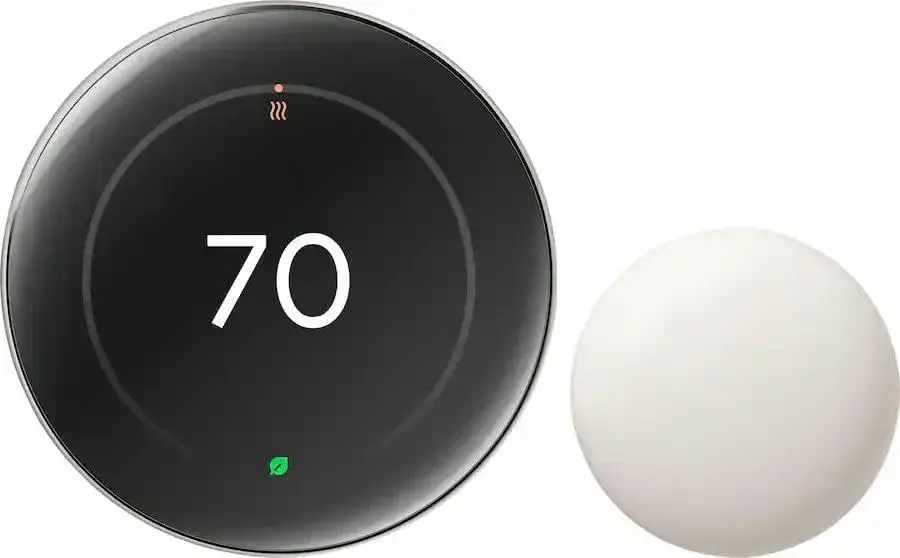 | 4.7 / 5 | Whole-home energy savings | |
Google Nest WiFi Pro (Wi-Fi 6E Mesh Router)  | 4.6 / 5 | Whole-home Wi-Fi coverage | |
Google Nest Audio Bluetooth Speaker  | 4.4 / 5 | Multi-room audio and voice control | |
Google TV Streamer 4K  | 4.5 / 5 | 4K home entertainment and smart home control | |
Google Pixel Watch 4 (45mm)  | 4.6 / 5 | Fitness and health tracking | |
Google Chromecast with Google TV  | 4.6 / 5 | Budget-friendly 4K streaming | |
Zooz 800 Series Z-Wave Long Range S2 Dimmer Switch (ZEN77)  | 4.5 / 5 | Long-range dimming and 3-way/4-way wiring | |
Zooz 700 Series Z-Wave Plus Outdoor Single Pl ug (ZEN05)  | 4.4 / 5 | Outdoor automation on a budget | |
Yale Security Deadbolt Lock SL with Z-Wave (YRD256-ZW2-619)  | 4.5 / 5 | Keyless entry and remote lock control | |
Aeotec Z-Wave Plus v2 Door/Window Sensor 7 Pro (Gen7)  | 4.6 / 5 | Entry-point monitoring | |
2GIG Smart Z-Wave Plus Programmable Thermostat (2GIGSTZ-1)  | 4.3 / 5 | Security-panel-integrated climate control | |
Aeotec Home Energy Meter 8  | 4.5 / 5 | Whole-home energy monitoring | |
Govee WiFi Water Leak Detector (3-Pack)  | 4.6 / 5 | Leak detection and flood prevention | |
First Alert Wireless Smoke & Carbon Monoxide Alarm (Z-Wave & Ring compatible)  | 4.7 / 5 | Fire and carbon monoxide safety |
Detailed Product Reviews
1. Google Nest Doorbell (Wired, 3rd Gen)
Rating: 4.6 / 5 | Best For: Front-door security
Why You Should Buy It: It gives you 2K HDR video and Gemini-powered intelligence that recognizes what's happening at your door and suggests what to do next, so you never miss a delivery, visitor, or potential intruder again.
Pros:
Sharp 2K HDR video with a wide 166° field of view
Hardwired — no batteries to recharge or replace
Gemini AI can identify packages, people, and activity
Works natively with the Google Home app
Cons:
Full Gemini features require a paid Google Home premium subscription
Wired installation means it's best suited to homes with existing doorbell wiring
Who It's Best For: Homeowners who want a permanent, always-powered video doorbell and are already invested in the Google Home ecosystem.
Price: Check Price on Amazon
2. Google Nest Cam Indoor (Wired, 3rd Gen)
Rating: 4.5 / 5 | Best For: Indoor and pet monitoring
Why You Should Buy It: This camera pairs crisp 2K HDR video with Gemini-powered descriptions, so instead of a generic motion alert you get context like what room something happened in and what it actually was.
Pros:
2K HDR video, Nest Cam's sharpest resolution to date
Encrypted video plus two-step verification for privacy
Smart, descriptive notifications with a premium subscription
Great for baby, pet, and general indoor monitoring
Cons:
Best notification detail is locked behind Google Home Premium
Wired-only design limits placement flexibility
Who It's Best For: Families who want an indoor security camera that does more than record — one that actually tells you what's going on.
Price: Check Price on Amazon
3. Google Nest Learning Thermostat (4th Gen, 2024)
Rating: 4.7 / 5 | Best For: Whole-home energy savings
Why You Should Buy It: It's Google's most advanced thermostat yet, using learning algorithms to automatically build a schedule around your habits so your home stays comfortable while your energy bill shrinks.
Pros:
Learns your schedule automatically — minimal manual setup
Included Nest Temperature Sensor evens out hot/cold rooms
Compatible with Alexa, Apple HomeKit, and Google Home
Elegant Polished Obsidian finish suits most interiors
Cons:
Premium price compared to basic programmable thermostats
HVAC compatibility should be checked before buying
Who It's Best For: Anyone who wants a 'set it and forget it' thermostat that pays for itself through energy savings over time.
Price: Check Price on Amazon
4. Google Nest WiFi Pro (Wi-Fi 6E Mesh Router)
Rating: 4.6 / 5 | Best For: Whole-home Wi-Fi coverage
Why You Should Buy It: With Wi-Fi 6E speeds up to twice as fast as standard Wi-Fi 6 and up to 2,200 sq ft of coverage per unit, it's built to keep every smart device in a busy smart home connected without lag.
Pros:
Tri-band Wi-Fi 6E for faster, less congested connections
Expandable mesh system for larger homes
Built-in guest mode and parental controls
Simple setup through the Google Home app
Cons:
Wi-Fi 6E benefits require compatible client devices
Larger homes may need multiple units for full coverage
Who It's Best For: Households running many smart home devices at once that need a fast, reliable mesh backbone.
Price: Check Price on Amazon
5. Google Nest Audio Bluetooth Speaker
Rating: 4.4 / 5 | Best For: Multi-room audio and voice contro
Why You Should Buy It: Nest Audio fills your home with rich, room-filling sound and works seamlessly with other Nest speakers and Chromecast-enabled devices, turning any room into part of a connected home audio system.
Pros:
30W power output for surprisingly full sound
Built-in Google Assistant for hands-free control
Pairs with other Nest Audio units for stereo sound
Easy, guided setup process
Cons:
Corded power only — not portable
Not waterproof, so it's indoor-use only
Who It's Best For: Anyone building a whole-home audio and voice-assistant system room by room.
Price: Check Price on Amazon
6. Google TV Streamer 4K
Rating: 4.5 / 5 | Best For: 4K home entertainment and smart home control
Why You Should Buy It: Beyond streaming Netflix, Hulu, and Prime Video in 4K HDR, this device doubles as a smart home control hub, letting you manage compatible devices right from your TV with the included voice remote.
Pros:
True 4K HDR streaming across major services
32 GB of onboard storage
Doubles as a smart home dashboard
Voice Search remote included
Cons:
Several streaming services require their own subscriptions
Requires an HDMI port and stable Wi-Fi or Ethernet
Who It's Best For: Households that want one device to handle both premium streaming and smart home control.
Price: Check Price on Amazon
7. Google Pixel Watch 4 (45mm)
Rating: 4.6 / 5 | Best For: Fitness and health tracking
Why You Should Buy It: With Gemini built in as your on-wrist AI assistant, up to 40 hours of battery life, and dual-frequency GPS, the Pixel Watch 4 turns everyday health tracking into genuinely useful, always-on insight.
Pros:
Up to 40-hour battery life with fast charging
Dual-frequency GPS for more accurate outdoor tracking
Gemini AI assistant built into the watch
Always-on display and comprehensive health tracking
Cons:
Best experience is tied to the Android/Pixel ecosystem
Premium pricing versus entry-level fitness trackers
Who It's Best For: Android users who want a serious fitness and smart-home-adjacent wearable with AI baked in.
Price: Check Price on Amazon
8. Google Chromecast with Google TV
Rating: 4.6 / 5 | Best For: Budget-friendly 4K streaming
Why You Should Buy It: It delivers the same crystal-clear 4K HDR streaming experience as pricier boxes, with access to over 700,000 movies and shows, at a fraction of the cost — making it the easiest entry point into the Google smart home ecosystem.
Pros:
Affordable way to add 4K HDR streaming to any TV
Personalized home screen pulls from all your apps
Compact and easy to travel with
Comes with a protective pouch and cleaning cloth
Cons:
Less onboard storage than the Google TV Streamer
Bluetooth/Wi-Fi only — no Ethernet port
Who It's Best For: Budget-conscious buyers who want a reliable 4K streaming upgrade without a big price tag.
Price: Check Price on Amazon
9. Zooz 800 Series Z-Wave Long Range S2 Dimmer Switch (ZEN77)
Rating: 4.5 / 5 | Best For: Long-range dimming and 3-way/4-way wiring
Why You Should Buy It: This dimmer gives you wireless brightness control without the flicker issues cheaper dimmers cause on LED bulbs, and its simple 3-way/4-way wiring means you don't need to add an auxiliary switch.
Pros:
Smooth dimming with no LED flicker
Long-range 800-series Z-Wave S2 security
Works with existing 3-way/4-way switch wiring
No auxiliary switch required
Cons:
Requires a Z-Wave hub, sold separately
120V only — no 0-10V control support
Who It's Best For: DIYers upgrading existing light switches who want reliable, hub-based dimming control.
Price: Check Price on Amazon
10. Zooz 700 Series Z-Wave Plus Outdoor Single Plug (ZEN05)
Rating: 4.4 / 5 | Best For: Outdoor automation on a budget
Why You Should Buy It: It brings smart scheduling and energy-saving automation to anything you plug in outdoors — holiday lights, fountains, or seasonal decor — while its IP65-rated housing keeps it safe from the elements.
Pros:
IP65 weatherproof housing for true outdoor use
Handles up to 15A resistive load
Broad hub compatibility, including Home Assistant and Hubitat
Simple, affordable entry into Z-Wave outdoor control
Cons:
No dimming control on this model
Requires a separate Z-Wave hub
Who It's Best For: Anyone wanting to automate outdoor lighting or seasonal décor without running new wiring.
Price: Check Price on Amazon
11. Yale Security Deadbolt Lock SL with Z-Wave (YRD256-ZW2-619)
Rating: 4.5 / 5 | Best For: Keyless entry and remote lock control
Why You Should Buy It: A backlit touchscreen keypad lets you ditch physical keys entirely, and once paired with a Z-Wave hub or alarm system, you can lock or unlock your door from anywhere — a genuine upgrade in everyday convenience and security.
Pros:
Keyless entry via touchscreen code pad
Auto-lock and one-touch relock features
Remote access when paired with a compatible hub
Durable stainless steel and zinc construction
Cons:
Requires accurate door measurements before purchase
Full remote features depend on a compatible Z-Wave system
Who It's Best For: Homeowners ready to replace a traditional deadbolt with a fully keyless, remotely controllable lock.
Price: Check Price on Amazon
12. Aeotec Z-Wave Plus v2 Door/Window Sensor 7 Pro (Gen7)
Rating: 4.6 / 5 | Best For: Entry-point monitoring
Why You Should Buy It: At 40% smaller than the previous generation but rated for over 3 years of battery life, this sensor gives you reliable door and window monitoring without a bulky footprint or constant battery changes.
Pros:
Compact, unobtrusive design
3+ year battery life on a single battery
Combines magnetic contact, dry contact relay, and tilt sensing
Optimized to use up to 66% less battery than prior models
Cons:
Tilt detection requires proper alignment with the magnet sensor
Needs a Z-Wave hub to function
Who It's Best For: Anyone building out a whole-home security system who needs discreet, long-lasting entry sensors.
Price: Check Price on Amazon
13. 2GIG Smart Z-Wave Plus Programmable Thermostat (2GIGSTZ-1)
Rating: 4.3 / 5 | Best For: Security-panel-integrated climate control
Why You Should Buy It: Built specifically to integrate with 2GIG security panels, this thermostat adds humidity sensing and S2 authentication security on top of standard programmable climate control, tying your HVAC into your broader alarm system.
Pros:
Direct integration with 2GIG GC2e/GC3e/GC3 panels
Humidity sensing alongside temperature control
S2 authentication for stronger wireless security
Can be powered from an HVAC system's 24VAC C-wire
Cons:
Best suited to households already using 2GIG security panels
Less flexible than ecosystem-agnostic thermostats
Who It's Best For: Homes with an existing 2GIG security system that want climate control on the same platform.
Price: Check Price on Amazon
14. Aeotec Home Energy Meter 8
Rating: 4.5 / 5 | Best For: Whole-home energy monitoring
Why You Should Buy It: Using clamp-on sensors rated for 200A and long-range 800-series Z-Wave, this meter tracks both energy usage and production in real time, giving you the data you need to actually lower your utility bills.
Pros:
Real-time usage and production tracking
Supports 2-phase power setups
Long-range Z-Wave 800-series connectivity
Compatible with SmartThings and Home Assistant
Cons:
Installation involves working near your electrical panel
Requires a Z-Wave hub for full functionality
Who It's Best For: Energy-conscious homeowners who want granular, real-time insight into where their power is going.
Price: Check Price on Amazon
15. Govee WiFi Water Leak Detector (3-Pack)
Rating: 4.6 / 5 | Best For: Leak detection and flood prevention
Why You Should Buy It: Placed near water heaters, sinks, or basements, these sensors send instant app and email alerts the moment they detect moisture, plus a loud 100dB alarm — catching small leaks before they become expensive repairs.
Pros:
Instant app, email, and sound alerts on leak detection
Gateway supports up to 20 connected sensors
Compact design fits tight spaces easily
Sold as a 3-pack for whole-home coverage
Cons:
Requires a Wi-Fi gateway for remote alerts
Battery-powered — needs periodic battery checks
Who It's Best For: Homeowners who want an early-warning system against costly water damage in basements or utility rooms.
Price: Check Price on Amazon
16. First Alert Wireless Smoke & Carbon Monoxide Alarm (Z-Wave & Ring compatible)
Rating: 4.7 / 5 | Best For: Fire and carbon monoxide safety
Why You Should Buy It: This 2-in-1 alarm protects against both fire and CO threats using a photoelectric sensor that minimizes false alarms, and its Z-Wave and Ring compatibility means it plugs straight into your existing smart home security setup.
Pros:
Combined smoke and carbon monoxide detection in one unit
Photoelectric sensor reduces false alarms
Z-Wave and Ring compatible for centralized monitoring
Simple test-and-silence button
Cons:
Battery-powered, so batteries need periodic replacement
Best value is realized when paired with a Z-Wave or Ring hub
Who It's Best For: Every smart home — this is the kind of device that belongs in every bedroom and hallway, hub or no hub.
Price: Check Price on Amazon
Buying Guide: How to Choose
Google Home vs. Z-Wave — what's the real difference?
Google Home devices connect directly to your Wi-Fi network and are managed entirely through the Google Home app — no extra hardware needed. Z-Wave devices instead communicate over a dedicated low-power wireless mesh network and require a central hub (like SmartThings, Home Assistant, or Hubitat) to function, but that mesh network tends to be more reliable at range and doesn't compete with your Wi-Fi for bandwidth.
Wired vs. battery-powered
Wired devices, such as the Nest Doorbell and Nest Cam Indoor, never need battery changes and can stream continuously, but installation is less flexible. Battery-powered devices, like the Aeotec sensors and Govee leak detectors, install anywhere in minutes but need occasional battery checks — look for stated battery life (some Z-Wave sensors now last 3+ years) before buying in bulk.
Range and Long Range (LR) Z-Wave
800-series Z-Wave Long Range devices, like the Zooz ZEN77 dimmer and Aeotec Home Energy Meter 8, extend usable range well beyond older Z-Wave generations, which matters for larger homes, detached garages, or outdoor devices placed far from the hub.
Subscriptions to budget for
Several Google Nest devices unlock their most advanced Gemini AI features (detailed activity summaries, tap-to-see descriptions) only with a paid Google Home Premium subscription, though a free trial is typically included. Factor this ongoing cost into your decision if AI-powered notifications are a priority.
Security certifications
For Z-Wave devices, look for S2 authentication security, found on the Zooz ZEN77 dimmer and 2GIG thermostat in this list, which provides stronger encryption for device-to-hub communication than older Z-Wave security standards.
Frequently Asked Questions
Do I need a hub to use these devices?
Google Nest and Pixel products connect directly over Wi-Fi through the Google Home app, no separate hub required. Z-Wave devices (Zooz, Yale, Aeotec, 2GIG, and the First Alert alarm) do require a Z-Wave hub, such as SmartThings, Home Assistant, or Hubitat, to function.
Can Google Home devices and Z-Wave devices work together in one smart home?
Yes. Many households run Google Nest products for cameras, audio, and streaming, while using a separate Z-Wave hub for locks, sensors, and switches. Some hubs and routines can bridge the two ecosystems for shared automation.
Do I need a subscription for the Gemini AI features?
Basic video and Gemini-based recognition on Nest cameras and the doorbell work out of the box, but the most detailed Gemini descriptions and activity summaries require a Google Home Premium subscription, which comes with a free trial period.
How long do battery-powered Z-Wave sensors last?
It varies by device. The Aeotec Door/Window Sensor 7 Pro is rated for more than three years on a single battery thanks to its optimized power design, while other sensors and the First Alert alarm should have batteries checked periodically.
Is Z-Wave Long Range worth choosing over standard Z-Wave?
Yes, if you have a larger home or detached structures. 700 and 800-series Long Range devices, like the Zooz dimmer and Aeotec energy meter in this guide, extend range significantly, reducing dead zones that standard Z-Wave can struggle with.
Which devices need professional installation?
The Yale Z-Wave deadbolt and any hardwired devices like the Nest Doorbell, Nest Cam Indoor, and 2GIG thermostat are usually DIY-friendly for anyone comfortable with basic tools, but homeowners unsure about wiring should consult a licensed electrician or locksmith.
Final Verdict: Google Home vs. Z-Wave Automation
If your priority is video, audio, streaming, and AI-powered convenience with minimal setup, the Google Home lineup — led by the Nest Learning Thermostat and Nest Doorbell — is the stronger choice. It's polished, works out of the box, and scales smoothly across cameras, speakers, and streaming devices. If your priority is dedicated, low-bandwidth reliability for locks, sensors, switches, and safety devices that keep working even during a Wi-Fi outage, the Z-Wave lineup — led by the Yale Deadbolt and First Alert Smoke & CO Alarm — is the better foundation.
In practice, the two aren't mutually exclusive: the most capable smart homes in 2026 tend to run Google Nest devices for the everyday convenience layer (doorbell, cameras, audio, streaming) alongside a Z-Wave hub handling the security and safety layer (locks, door sensors, smoke/CO alarms, and energy monitoring) — giving you the best of both without compromising on either.

