Zigbee & Philips Hue Smart Home Buying Guide 16 Devices Compared: Hubs, Lighting, Sensors, Security & Irrigation for 2026
- Brandly Ombonyo

- Jul 8
- 11 min read
We believe in recommending tools and materials we’d use ourselves. Our recommendations are based on independent research and real-world testing. While we may receive commissions for purchases made through our links, our opinions remain our own — un-compromised and expert-led.
Author: Brandly Ombonyo is a Project Management Consultant specializing in automation, advanced security, and intelligent systems integration. He delivers expert design, procurement, and deployment of surveillance, access control, and energy management solutions for developers. Ultimately, Brandly engineers secure, future-ready environments that maximize operational excellence and long-term asset value.
Introduction
Building a smart home in 2026 usually comes down to one decision: how much of your ecosystem do you want to be self-contained versus open and expandable? This guide compares 16 real devices across two of the most popular paths — the polished, tightly-integrated Philips Hue system and the flexible, budget-friendly world of open Zigbee 3.0 hardware from brands like SONOFF and THIRDREALITY.
We've grouped hubs, bulbs, plugs, switches, motion and contact sensors, a video doorbell, security cameras, a sprinkler timer, and a radiator valve into one side-by-side comparison so you can see exactly what each device does, what it costs, and who it's actually built for — whether you're starting from scratch or adding onto a system you already own.
Editor's Picks
Award | Product | Why We Picked It |
Best Overall Smart Home Hub | Philips Hue Bridge Pro  | Fastest processor and largest device capacity in this guide, built for whole-house automation. |
Best Budget Pick | SONOFF Zigbee Bridge Pro Hub  | Supports up to 128 devices for under $25 — the lowest cost-per-device ratio we found. |
Best for Home Security | Philips Hue Secure Wired Video Doorbell + Chime 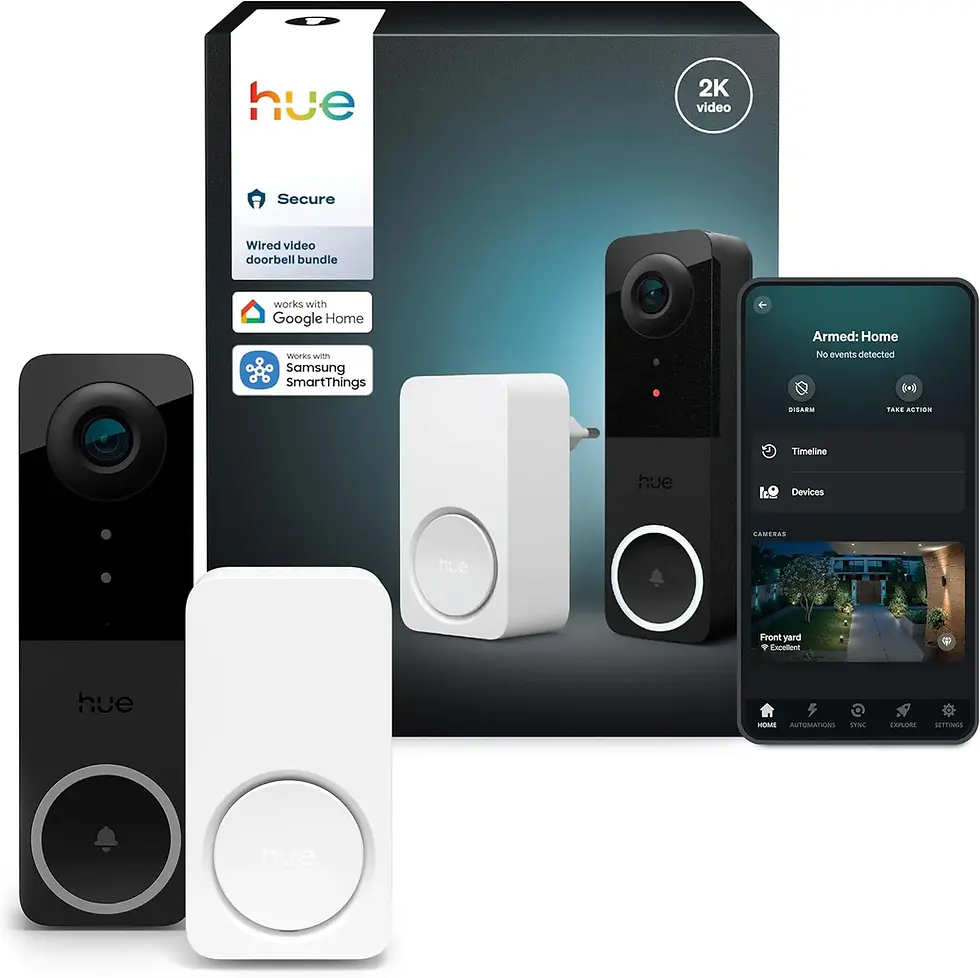 | Combines HD video, two-way audio, and automatic light-triggering in one integrated system. |
Full Comparison Table
Product | Category | Rating | Price |
Philips Hue Bridge Pro | Smart Hub | 4.8 / 5 | |
Philips Hue Smart Plug (2-Pack) 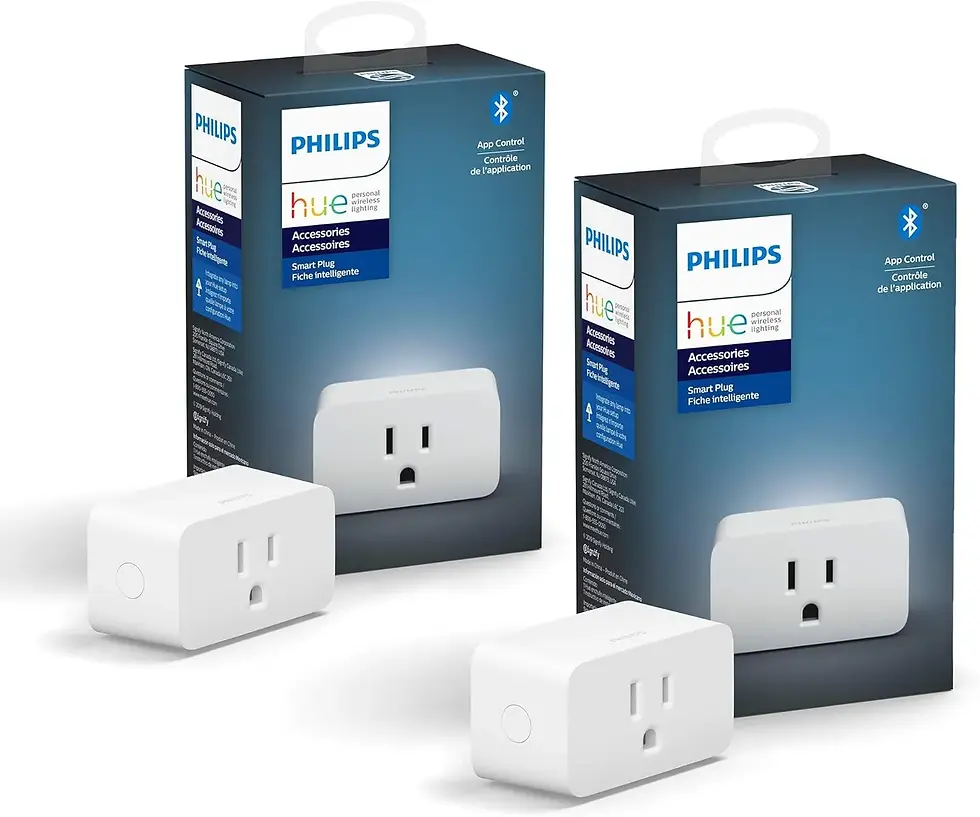 | Smart Plug | 4.5 / 5 | |
Philips Hue Smart Dimmer Switch Remote 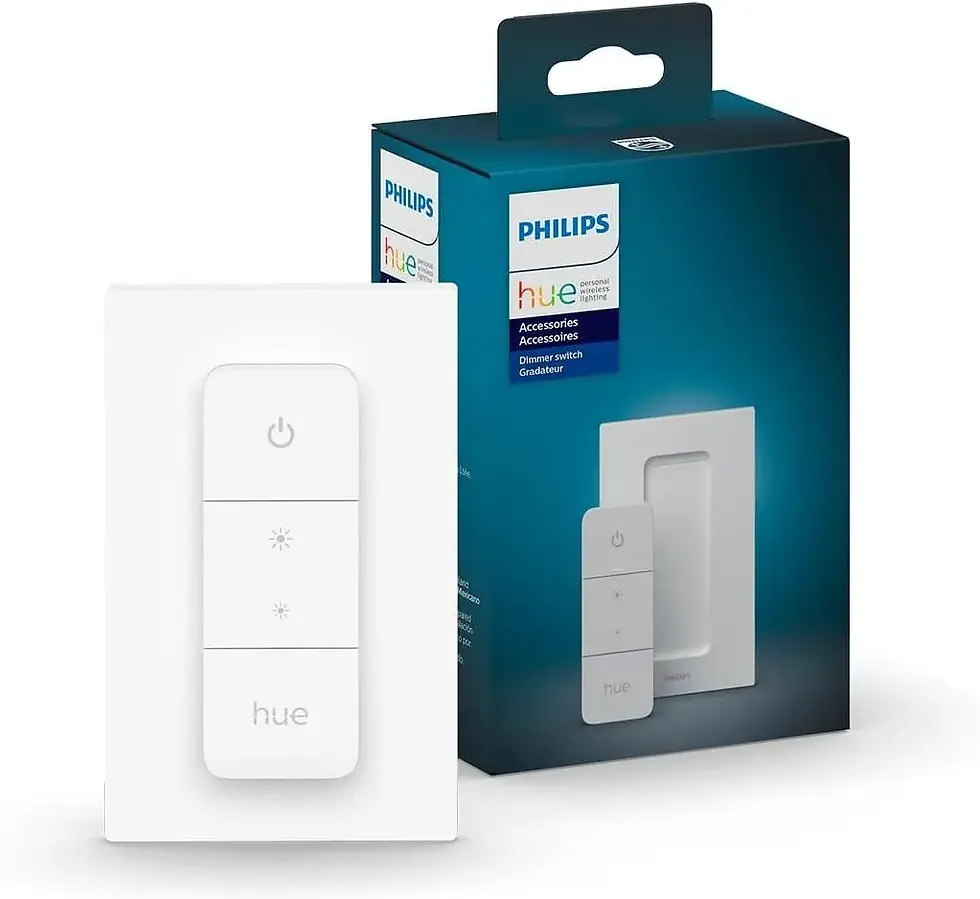 | Wall Switch / Remote | 4.6 / 5 | |
Philips Hue Motion Sensor  | Motion Sensor | 4.4 / 5 | |
Philips Hue Play HDMI Sync Box 8K  | Entertainment / Sync Box | 4.7 / 5 | |
Philips Hue Secure Wired Smart Security Camera  | Security Camera | 4.3 / 5 | |
Philips Hue Secure Wired Video Doorbell + Chime | Video Doorbell | 4.6 / 5 | |
Philips Hue Outdoor Motion Sensor  | Outdoor Motion Sensor | 4.5 / 5 | |
THIRDREALITY Smart Color Bulb ZB3 (4-Pack)  | Smart Bulb | 4.4 / 5 | |
SONOFF Zigbee Sprinkler Timer (SWV-NH)  | Irrigation Controller | 4.2 / 5 | |
SENCKIT Smart Thermostat Radiator Valve  | Thermostat Valve | 4.1 / 5 | |
SONOFF Zigbee Bridge Pro Hub  | Smart Hub | 4.5 / 5 | |
SONOFF SenseGuard DW Gen2 Door/Window Sensor (4-Pack)  | Door/Window Sensor | 4.3 / 5 | |
THIRDREALITY Zigbee Motion Sensor (4-Pack)  | Motion Sensor | 4.4 / 5 | |
THIRDREALITY Multi-Function Night Light (4-Pack)  | Night Light / Repeater | 4.3 / 5 | |
THIRDREALITY Zigbee Contact Sensor (4-Pack)  | Door/Window Sensor | 4.3 / 5 |
Philips Hue Lineup — Detailed Reviews
1. Philips Hue Bridge Pro
Why You Should Buy It: The Hue Bridge Pro is the brain of any serious Philips Hue installation. It runs on a 1.7GHz quad-core Cortex-A35 chip, which means automations, scenes, and AI-driven routines fire instantly instead of lagging a few seconds behind a button press. With 8GB of flash storage and 8GB of DDR4 RAM, it can manage up to 150 lights and 50 accessories while storing 500 personalized scenes, so it scales from a one-bedroom apartment to a full house without slowing down.
Pros: Massive device capacity, very fast processing, works with Apple Home, Alexa, Google, and SmartThings, supports Hue MotionAware for automatic lighting.
Cons: It's an added cost on top of individual bulbs, and full functionality (remote access, advanced automations) requires bulbs and accessories to be Hue-branded.
Who It's Best For: Homeowners building a whole-house lighting system who want rock-solid reliability and room to keep expanding for years.
Price: Check Price on Amazon
2. Philips Hue Smart Plug (2-Pack)
Why You Should Buy It: This two-pack instantly turns any lamp, fan, or appliance into a smart device without needing a Hue-compatible bulb. It's Matter-compatible, so it plays nicely with almost any modern smart home platform, and its compact, subtle white design disappears behind furniture instead of standing out.
Pros: Works with lights that aren't Hue bulbs, Matter compatible, discreet design, simple voice control setup.
Cons: Best features (remote access, automations) still benefit from having a Hue Bridge on the network.
Who It's Best For: People who want to smarten up existing lamps or small appliances without replacing every bulb in the house.
Price: Check Price on Amazon
3. Philips Hue Smart Dimmer Switch Remote
Why You Should Buy It: A battery-powered remote that dims, brightens, and cycles through preset scenes with zero wiring. It gives every member of the household — including kids and guests — an easy physical way to control Hue lights without needing a phone.
Pros: No wiring or electrician needed, budget-friendly, easy for non-tech-savvy household members, cycles through favorite scenes.
Cons: Requires a Hue Bridge to unlock full scene control and Matter connectivity.
Who It's Best For: Households that want a simple physical control point in rooms where reaching for a phone app is inconvenient.
Price: Check Price on Amazon
4. Philips Hue Motion Sensor
Why You Should Buy It: This battery-powered sensor automatically triggers Hue lights when it detects movement, and it's built for flexible placement in driveways, garages, gardens, sidewalks, and terraces. Setup is wireless and takes minutes.
Pros: Fully wireless installation, versatile indoor/outdoor placement, works with the wider Hue automation system.
Cons: Needs a Hue Bridge, and battery life will vary depending on how often it triggers.
Who It's Best For: Anyone wanting hands-free lighting in transitional spaces like hallways, garages, or entryways.
Price: Check Price on Amazon
5. Philips Hue Play HDMI Sync Box 8K
Why You Should Buy It: This is the premium pick for anyone serious about immersive gaming or movie nights. It syncs Hue lighting to on-screen content at up to 8K/60Hz or 4K/120Hz, and it can connect up to four HDMI devices at once, including current-generation consoles.
Pros: Ultra-fast refresh rate, supports the latest resolutions and consoles, connects multiple devices, fully customizable intensity and surround effects.
Cons: The highest price point in this guide, and it only syncs with HDMI sources, not smart TV apps directly.
Who It's Best For: Home theater and gaming enthusiasts who want their room lighting to react to what's on screen in real time.
Price: Check Price on Amazon
6. Philips Hue Secure Wired Smart Security Camera
Why You Should Buy It: A wired 1080p HD camera with night vision, two-way talk, and motion detection that ties directly into the Hue ecosystem — lights can turn on automatically or send an alert straight to your phone the moment motion or sound is detected.
Pros: Affordable entry point into Hue Secure, real-time notifications, customizable activity/package detection zones, integrates with existing Hue lights.
Cons: Wired installation only, so placement is limited by where you can run a cable.
Who It's Best For: Buyers who already have Hue lighting and want an affordable way to add basic monitoring.
Price: Check Price on Amazon
7. Philips Hue Secure Wired Video Doorbell + Chime
Why You Should Buy It: This 2K wide-angle doorbell bundle pairs with a smart chime and integrates directly with Hue lighting, so your porch or entryway lights can switch on the instant motion is detected. Two-way audio lets you speak with visitors from anywhere.
Pros: Sharp 2K resolution, wide field of view, seamless integration with existing Hue lights, real-time mobile notifications.
Cons: Requires a wired installation and is priced higher than most standalone doorbells on the market.
Who It's Best For: Homeowners who want their front-door security and lighting working together as one system.
Price: Check Price on Amazon
8. Philips Hue Outdoor Motion Sensor
Why You Should Buy It: Purpose-built for the elements, this weatherproof sensor covers a wide 160-degree detection area up to 39 feet and automatically switches outdoor (or indoor) lights on when it senses movement, with a built-in dusk-to-dawn mode.
Pros: Wide detection range, weatherproof housing, dusk-to-dawn automation, compatible with Alexa, Google Assistant, and Apple HomeKit.
Cons: Battery-powered, so it will need periodic battery replacement in high-traffic areas.
Who It's Best For: Driveways, front yards, and backyards where you want lights to respond automatically to anyone approaching.
Price: Check Price on Amazon
Open Zigbee Lineup — Detailed Reviews
9. THIRDREALITY Smart Color Bulb ZB3 (4-Pack)
Why You Should Buy It: A budget-friendly way to get full RGB color and 650-lumen brightness across four fixtures at once. Built on the open Zigbee 3.0 standard, these BR30 bulbs work with an unusually wide range of hubs, from Home Assistant to SmartThings to Hubitat, rather than locking you into one ecosystem.
Pros: Very competitive price for a 4-pack, true RGB color, broad hub compatibility, ETL/FCC certified.
Cons: Requires a separate Zigbee hub (not included), and BR30 bulbs need 5–6 inch recessed cans to fit properly.
Who It's Best For: Buyers already invested in an open smart home platform like Home Assistant or SmartThings who want affordable color lighting.
Price: Check Price on Amazon
10. SONOFF Zigbee Sprinkler Timer (SWV-NH)
Why You Should Buy It: This Zigbee 3.0 sprinkler timer automates garden, lawn, and pool watering with volume- or time-based schedules, and it logs daily, monthly, and six-month watering history so you can fine-tune usage and cut waste.
Pros: Reduces water waste through data-driven scheduling, works with Alexa and Google Home, supports single and cycle watering modes.
Cons: Needs a compatible Zigbee gateway, and outdoor placement means checking weatherproofing before installation.
Who It's Best For: Anyone who wants to automate garden or lawn irrigation and actually track how much water they're using.
Price: Check Price on Amazon
11. SENCKIT Smart Thermostat Radiator Valve
Why You Should Buy It: This compact Zigbee radiator valve adds app-based temperature control to floor heating or radiator systems, with a clear LCD display and features like windowing detection, anti-freeze mode, low-voltage warnings, and a child lock.
Pros: Precise room-by-room temperature control, child lock for safety, compatible with Alexa and Google Home, compact design.
Cons: Requires a Tuya Zigbee hub sold separately, and setup is more technical than plug-and-play devices.
Who It's Best For: Homes with radiator or floor heating systems that want zoned, app-controlled climate management.
Price: Check Price on Amazon
12. SONOFF Zigbee Bridge Pro Hub
Why You Should Buy It: The most affordable hub in this guide, supporting up to 128 sub-devices — four times the typical 32-device limit on entry-level gateways. It runs local smart scenes even during a network outage and bridges Zigbee devices with Wi-Fi devices on the same network.
Pros: Excellent price-to-capacity ratio, works offline for local automations, dual Wi-Fi/Zigbee protocol support, built-in home security modes.
Cons: Best suited to SONOFF and general Zigbee 3.0 devices rather than proprietary ecosystems like Hue.
Who It's Best For: Budget-conscious buyers who want to build a large, expandable Zigbee network without paying premium hub prices.
Price: Check Price on Amazon
13. SONOFF SenseGuard DW Gen2 Door/Window Sensor (4-Pack)
Why You Should Buy It: A four-pack of open/close sensors with a tamper-detection button that sends instant phone alerts if a sensor is removed or a door or window opens unexpectedly, powered by long-lasting replaceable AAA batteries.
Pros: Great value for a 4-pack, tamper alerts add an extra security layer, replaceable batteries, works with Alexa, Home Assistant, and SmartThings.
Cons: Needs a Zigbee hub to operate and doesn't include a hub in the box.
Who It's Best For: Securing multiple doors and windows at once on a budget, especially alongside an existing Zigbee hub.
Price: Check Price on Amazon
14. THIRDREALITY Zigbee Motion Sensor (4-Pack)
Why You Should Buy It: A pet-friendly four-pack of motion sensors that trigger custom Alexa routines the moment movement is detected, with broad compatibility across Home Assistant, SmartThings, Aeotec, Homey, and Hubitat.
Pros: Pet-friendly detection reduces false alarms, four sensors cover more rooms per purchase, wide hub compatibility, easy wall mounting.
Cons: Pricier per-pack than single-sensor alternatives, and still requires a separate Zigbee hub.
Who It's Best For: Multi-room households with pets that want reliable motion-triggered automations without constant false positives.
Price: Check Price on Amazon
15. THIRDREALITY Multi-Function Night Light (4-Pack)
Why You Should Buy It: This 3-in-1 device combines a motion sensor, an illumination sensor, and an adjustable RGB night light in one plug-in unit, and it doubles as a Zigbee signal repeater to extend network range through the house.
Pros: Three functions in one device, extends Zigbee network range, 1–100% adjustable brightness, simple plug-in installation.
Cons: Highest price point among the Zigbee accessories here, reflecting its multi-function design.
Who It's Best For: Extending Zigbee coverage to far corners of the home while adding practical night lighting for kids' rooms or hallways.
Price: Check Price on Amazon
16. THIRDREALITY Zigbee Contact Sensor (4-Pack)
Why You Should Buy It: A hassle-free four-pack of door and window sensors that pair in seconds with compatible Echo devices or hubs, giving broad home automation coverage across entry points.
Pros: Very fast pairing process, wide hub compatibility, good coverage with a 4-pack, compact form factor.
Cons: Functionally similar to the SONOFF sensor pack at a higher price point, so compare before buying both.
Who It's Best For: Buyers standardizing on THIRDREALITY or Echo-based Zigbee hubs who want quick, reliable entry monitoring.
Price: Check Price on Amazon
Buying Guide: How to Choose
Start with your hub strategy. Philips Hue devices are built to run through a Hue Bridge, which trades some flexibility for a simpler, more polished experience and guaranteed compatibility across the Hue lineup. Generic Zigbee 3.0 devices need a Zigbee hub too, but they can connect to a wider range of platforms — Home Assistant, SmartThings, Aeotec, Hubitat, Homey, or an Echo device with a built-in Zigbee radio — which usually costs less and gives you more control over automations.
Match device type to task. Motion and contact sensors are ideal for automations you don't want to think about — lights turning on when you walk in, alerts when a door opens unexpectedly. Plugs and dimmer switches give you manual control without rewiring anything. Cameras and doorbells add visual verification on top of basic motion detection, which matters most for entryways and package-prone porches.
Consider battery versus wired power. Battery-powered sensors and remotes are easy to place anywhere but need occasional battery swaps; wired cameras, doorbells, and the HDMI sync box need a permanent power source but never run out of charge mid-automation.
Check your device ceiling before you commit to a hub. If you plan to eventually run 50+ devices, a higher-capacity hub like the Hue Bridge Pro or the SONOFF Zigbee Bridge Pro (128 devices) will save you from having to migrate everything to a new hub later.
Look for Matter compatibility. Several devices in this guide, including the Hue Smart Plug and Dimmer Switch, support the Matter standard, which future-proofs them against ecosystem changes and reduces the risk of a device becoming obsolete if you switch platforms.
Frequently Asked Questions
Do I need a separate hub for every device on this list?
Not always. The Philips Hue devices work best with a Hue Bridge, and most Zigbee devices in this guide need a Zigbee 3.0 hub (such as the SONOFF Zigbee Bridge Pro) or a hub built into an Echo device. A handful of plugs and switches can operate with reduced functionality using Matter without a dedicated hub.
What's the real difference between the Hue ecosystem and generic Zigbee devices?
Hue app, which makes setup simpler at the cost of some flexibility. Generic Zigbee devices from brands like SONOFF and THIRDREALITY are more open and typically cost less, but may need more manual configuration inside a platform like Home Assistant or SmartThings.
Can Zigbee and Hue devices work together in the same home?
Yes. Since both rely on the Zigbee protocol, many setups run a Hue Bridge for lighting alongside a separate Zigbee hub for sensors and plugs, or consolidate everything through a platform like Home Assistant that can talk to both.
Which products need batteries versus a wired connection?
Motion sensors, contact sensors, and remotes in this list are battery-powered for flexible placement, while the security cameras, video doorbell, and HDMI sync box require a wired power connection.
Is it worth paying more for the Hue Bridge Pro instead of a basic hub?
If you plan to run more than 40–50 devices, want the fastest automation response times, or plan to add AI-driven features over time, the extra processing power and memory make the Bridge Pro worth the higher price. Smaller setups may be well served by a budget hub instead.
Final Verdict: Philips Hue vs. Open Zigbee
If we had to boil this whole comparison down to one choice, it comes down to Philips Hue's polish versus open Zigbee's value and flexibility.
Choose Philips Hue if: you want a system that works reliably out of the box, integrates cleanly with Apple Home, Alexa, Google, and SmartThings, and you don't mind paying a premium for that consistency. The Bridge Pro, Play HDMI Sync Box, and Secure camera/doorbell lineup are the strongest choices here for buyers who prioritize a seamless, unified experience over customization.
Choose Open Zigbee (SONOFF / THIRDREALITY) if: your priority is stretching your budget further, running a larger number of devices per dollar, or building inside a flexible platform like Home Assistant. The SONOFF Zigbee Bridge Pro alone supports four times the devices of a typical entry-level hub for roughly a quarter of the price of the Hue Bridge Pro.
Many households end up running both — a Hue Bridge dedicated to lighting scenes and ambiance, paired with an open Zigbee hub handling sensors, irrigation, and security devices. Whichever direction you choose, every product in this guide is Zigbee 3.0 based, which means the underlying technology will keep working together even as you expand your setup over time.
